Bus SOS - Vehicle Breakdown Assistance
Bus breakdowns are infrequent, but when they happen, there is a lot to coordinate and every second counts...
This feature allows you to find your nearby vehicles and also broadcast a request to companies in your area. Companies with nearby vehicles or yards will be notified immediately and given details on how to respond to your request.
The goal is to minimize the time & effort required by your drivers & staff to get help when needed.
This can also serve as an additional revenue stream for idle vehicles and drivers.
There is NO FEE to register as a 'yard only' SOS provider. You will simply receive requests when an SOS event happens near any of your yards.
How It Works

1. Register Your Fleet
Register your company to send requests by configuring a telematics provider or to only receive requests as a 'yard only' provider.
Existing fleet customers, email support to enable this feature and then configure options from the settings page.

2. Send An SOS Request
When a vehicle breaks down, drivers can simply send an SMS to the phone # provided in this format:
"SOS Bus123"
The request is processed and an SMS confirmation is returned to the driver.

3. Receive Your Company's Results
The system finds the location of the bus and finds other nearby buses and yards from your company.
An email & SMS is sent to all configured recipients with results.

4. Other Companies Are Notified
All other companies with this feature enabled and at least 1 vehicle or yard in range, will receive a message with the request details.
They can choose to reach out or simply ignore the request if they aren't able to help.
Get Results Instantly When Sending an SOS Request
Simply send an SMS to the phone # provided...in seconds, you will receive an SMS with the request details and map view with your nearby vehicles and nearby yards from your company & others.


Results When Receiving an SOS Request
Companies with at least 1 nearby vehicle or yard will receive an email & SMS with the request details and map view of the SOS vehicle location and their nearby vehicles & yards.
note - your vehicle info is never shared directly with the requesting company or any other company


Manage SOS Events Sent or Received
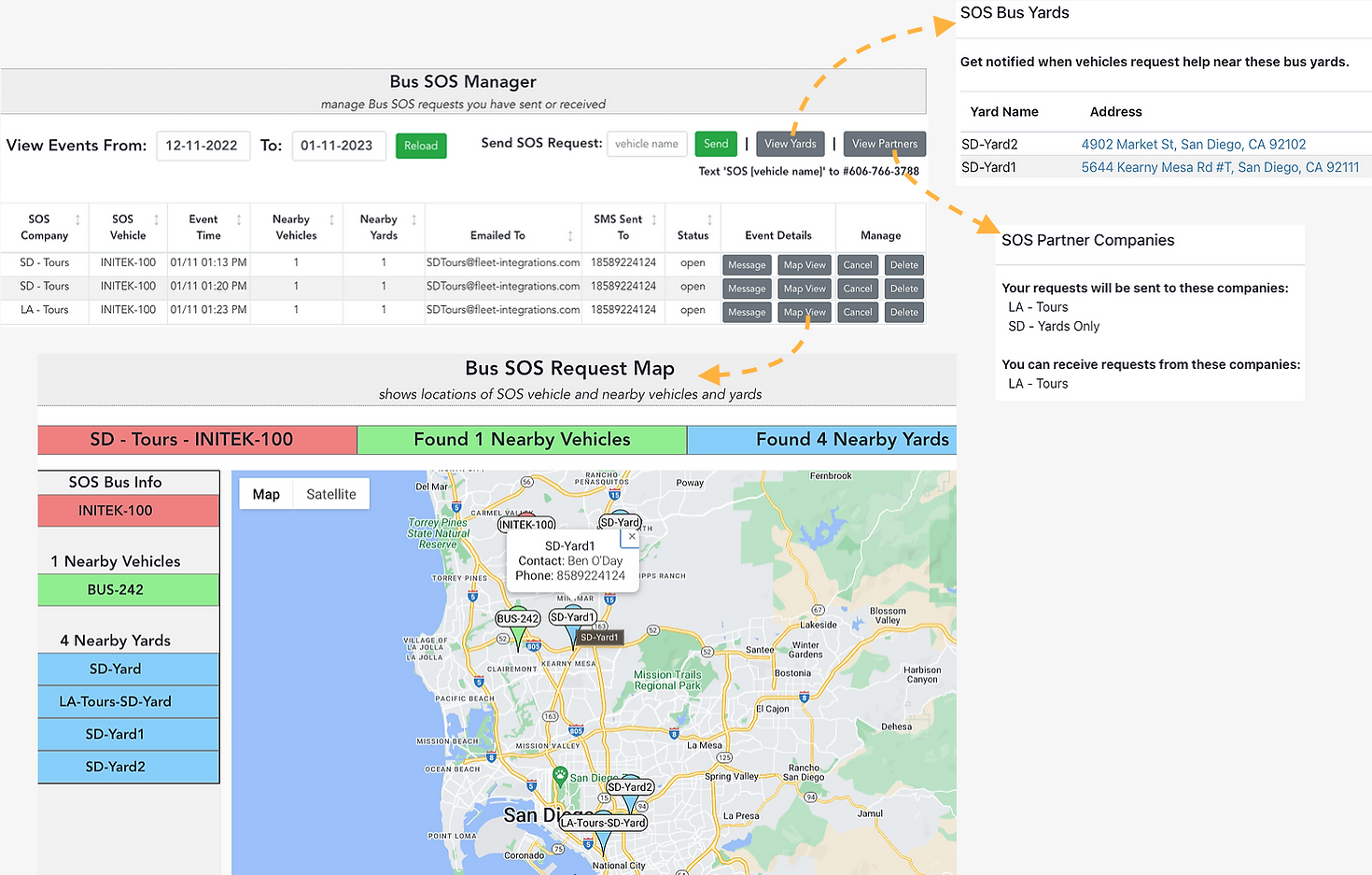
From the Bus SOS Manager page, you can send requests,
view yards, view partners and manage SOS events